
This page explains a traffic or event plan that will not save because a municipality review has locked it.
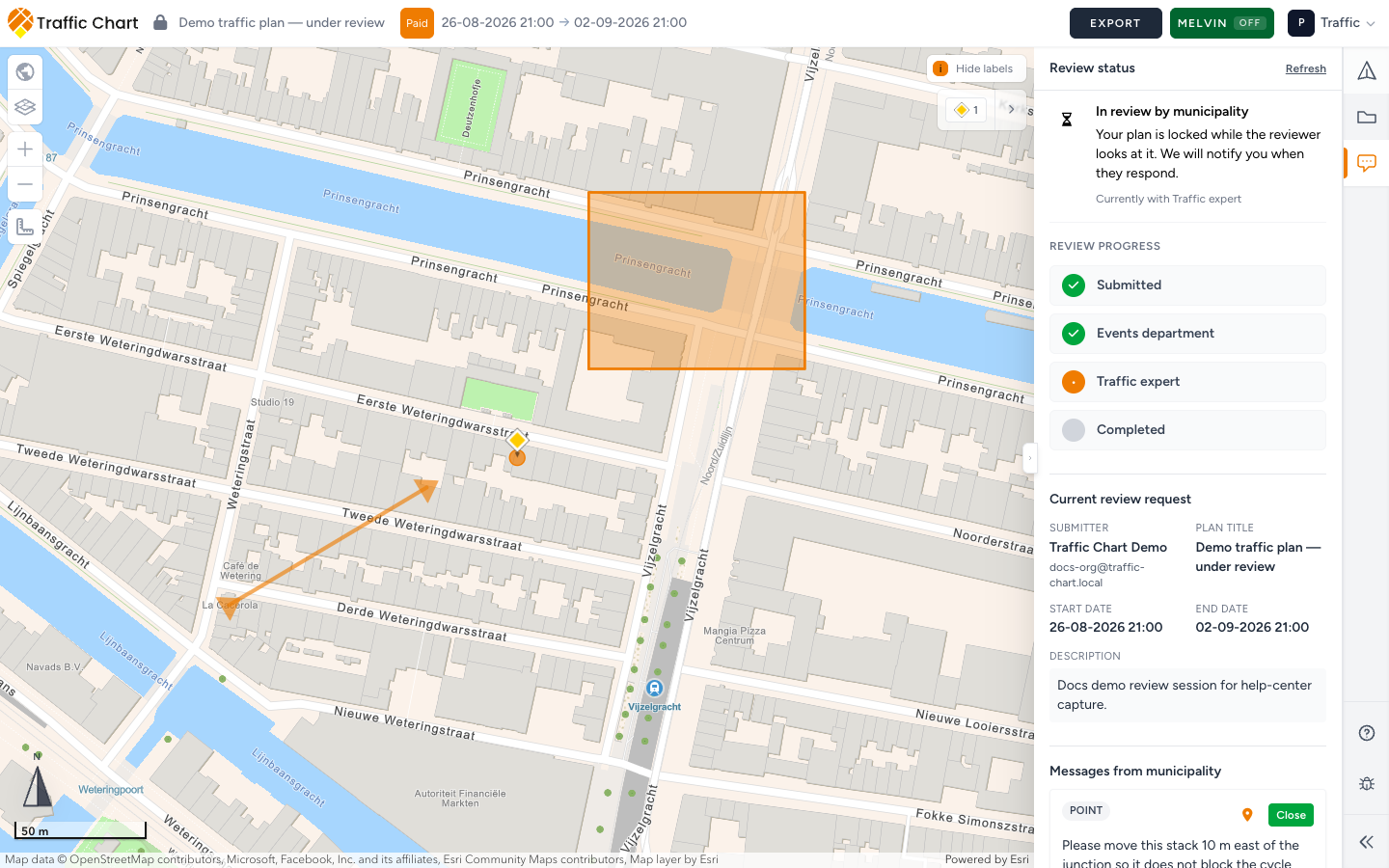
Use it when the header lock says Plan is locked while under review or This plan is locked because it has been approved. If the plan is only Plan is read-only because of a share link or because you are not the assigned editor, use I can’t open or edit a plan instead.
In-app Approved is not a legal permit. Extra steps may sit outside the app.
In review by municipality
When the municipality clicks Start review session, the drawing locks. Comments shows In review by municipality and Your plan is locked while the reviewer looks at it. We will notify you when they respond.
Header Save is Plan is locked while under review. Sidebar tools: Plan is under review. Event plans also say This event plan is locked and cannot be edited. You can still pan, zoom, and read Messages from municipality. You cannot place signs or objects.
You do not start that first session yourself. If Comments still says Ready to submit?, wait for their procedure (often a Sharable link). If you try anyway, the app can say Initial review requests are currently started by the municipality. Submit your plan through the municipality procedure first.
If Comments says Place traffic objects to start a review or Place event objects to start a review, the dossier has nothing to attach yet. Click Place event objects (or place traffic signs) on the real site. Areas, Lines & Routes, and Add text do not count for event review routing.
Leave the plan alone until they answer. Do not Duplicate to dodge the lock — the copy drops the review history. Could not save traffic plan during a lock means the server already closed the drawing; wait for the reload copy: Your latest changes could not be saved. Reloading the latest version...
Approved stays locked
Plan approved means this drawing is accepted in Traffic Chart. This plan has been approved. Further edits are disabled. The header can say This plan is locked because it has been approved. Tools: Plan is approved and locked.
That lock is the point: the reviewed file stays stable. Share-link viewers can still open it read-only.
In-app Approved is not a legal permit by itself. If you must change an approved plan, ask the municipality how they want a new version. You cannot unlock it yourself. Resubmit error if you try: This plan is already approved and cannot be resubmitted.
You cannot move a plan under review
From Personal, Move to organization is blocked while review is active: Under review — move unavailable. Body: Plans with an active municipality review stay in Personal. You can still copy this plan into an organization if you need a separate version. Tooltip: A plan under review cannot be moved. Copy it instead, or wait until the review is finished.
Wait until review is finished if you meant Move. Copy is still allowed if you need a separate organization version.
Wait for Changes requested
You edit again when the municipality asks for a new version.
| Status | Can you edit? |
|---|---|
| In review by municipality / Submitted | No |
| Changes requested (and feedback has reached you) | Yes — edit the same plan, Save, then Send for review |
| Review closed (rejected) | Yes, then Send for review if they want another look |
| Plan approved | No — stays locked |
Send for review uses Municipality, Message (optional), Send review request. Success: Review request sent. Fail: Could not submit review request. No reviewer: We could not find a reviewer / No reviewer is linked to the selected municipality.
If Direct communication is off, you may first see The traffic expert left feedback. The events department will forward it to you. Wait until Events uses Forward feedback to submitter. Until then you cannot resend. Pending copy: Municipality feedback has not been forwarded to you yet.
Comments may still show coming soon with We are finalizing the new sidebar experience. Comments will unlock after the next release. Map remarks from reviewers still sit on Pin, Arrow, Rectangle when a session is open.
Full walkthrough: Review for organisers. Status panel: Comments, review status, and map notes.
What good looks like
Under review, you wait. After Changes requested, the same plan unlocks, you edit it, and Send review request locks it again. You did not move or duplicate the file that is in the dossier.
If it still fails
Email customer@traffic-chart.com with the plan URL, whether the header says under review or Plan approved, and whether you are the assigned editor. Contact support.