This page fixes a traffic-sign catalogue that does not match the country you meant, or a sign you cannot find.
Use it on a Traffic Plan. Event plans do not use the traffic-sign catalogue — use a traffic plan for official road signs on public roads. Event objects, hydrants, and NDW Signs are a different overlay: Event map layers and hydrants.
Wrong country on the plan
The catalogue follows Country chosen when you created the plan. You cannot mix full national catalogues on one plan.
- On Home, choose Traffic Plan. The form says country is used to display the correct traffic signs. Set Country before Start planning. Validation if it is empty: Select a country.
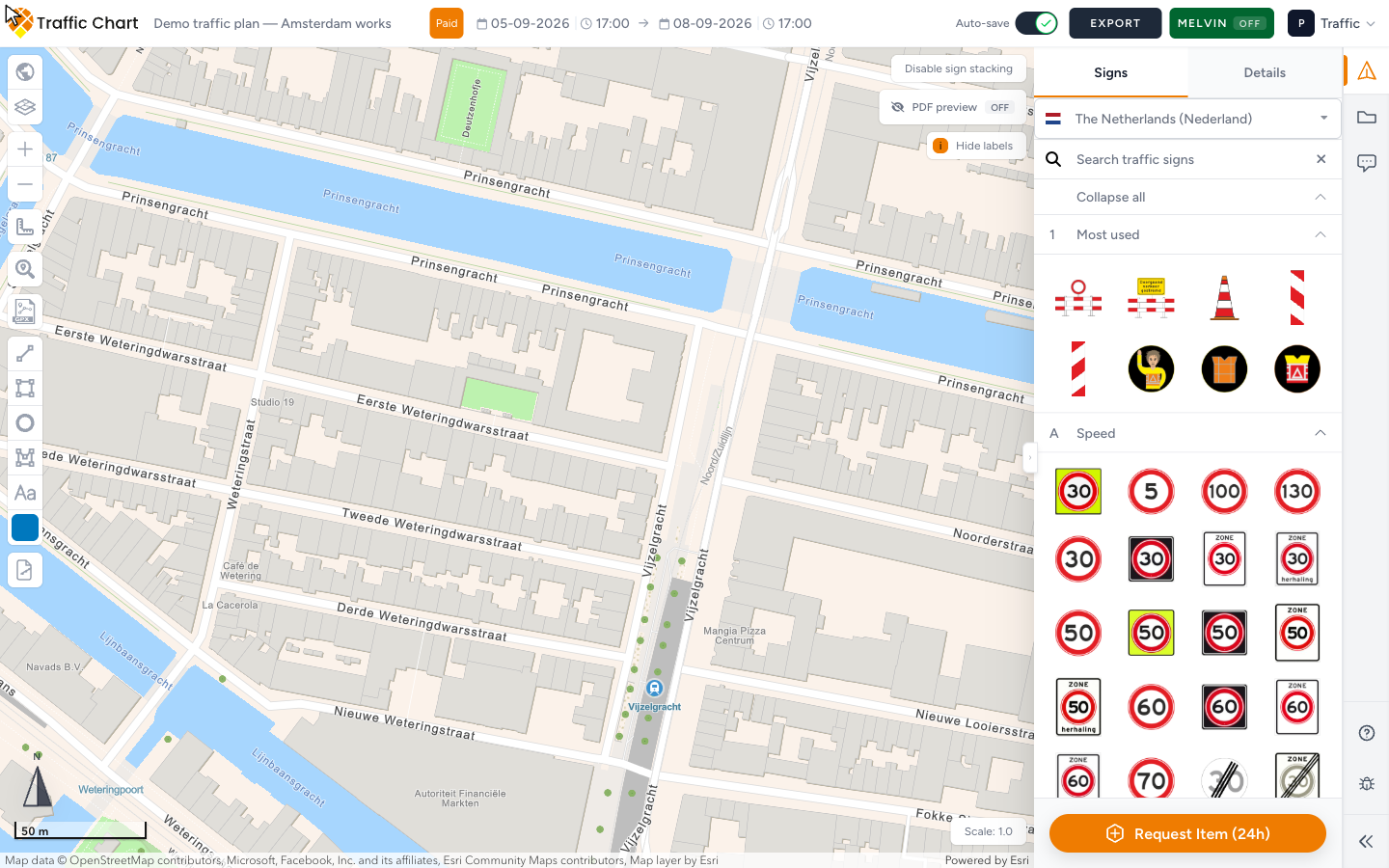
- In the editor, confirm the loaded set. You may see a toast such as Showing signs for The Netherlands (Nederland) based on traffic plan.
- Open Traffic Objects → Signs. The country name at the top of Signs must match the road authority (Netherlands for Utrecht, Belgium for a Flanders road, and so on).
- If the plan was created under the wrong country, create a new plan with the correct Country. When in doubt, start fresh rather than duplicating.
- Re-place signs from the correct catalogue.
Duplicate copies the wrong catalogue with the plan. Changing the title does not change Country.
Dates do not change the catalogue. They do matter for layers such as Melvin (Fill in a date to use this option).
Older plans that never got a country may show Continue your traffic plan. Finish Country, Plan name, and Duration, then Continue planning. Warning on that screen: Please complete the required fields before continuing. Body: To proceed, you must select a country (used to display the correct traffic signs) and provide both a start and end date for your traffic plan.
Sign not in the catalogue
- Open Signs.
- Search by code and by description in Search traffic signs.
- Expand categories. Use Expand all / Collapse all if the list is long. English groups typically include Most used, Speed, Priority, Road Closure, Mandatory Direction, Parking & Stopping, Commands & Prohibitions, Traffic Regulations, Built-up Area, Warning, Direction, Information, Waterways, Custom, Subsigns, Roadwork, Symbols, Pedestrians / School, Emission zones, Events.
- Empty search: No signs found. Clear the field or try a shorter code.
- Combination / composite templates appear only where they are configured for that country. Open a placed template with Edit sign. Title: Combination sign. Combination signs.
- If the item is still missing, use Request Item (24h) at the bottom of the Signs panel. Request a missing sign or object. Or email customer@traffic-chart.com with the sign code and country.
A greyed Bulk signs or Displace sign stack control is an account permission, not a missing plate. Bulk signs tooltip: Pro feature / You need an organization account to use bulk sign placement. Displace sign stack tooltip: Pro feature / You need a PRO account to displace traffic signs. Feature not available for my account.
Catalogue failed to load
If Signs stays empty after a wait, look for Could not load traffic signs. Refresh the tab. If the map is also white, fix the basemap first: Map will not load or stays blank. Could not load global data is the same family — retry, then write support with the plan URL.
What good looks like
Signs lists the national set for the plan’s Country. The toast named the country you meant. Search finds the code you expect, or Request Item (24h) is on its way.
Next click
| You see | Do this |
|---|---|
| Showing signs for The Netherlands (Nederland) based on traffic plan | Confirm that is the road authority. If not, create a new plan. |
| No signs found | Clear Search traffic signs, or try the code without spaces. |
| Could not load traffic signs | Refresh. If the map is white, Map will not load or stays blank. |
| Please select a road type | Open Details and pick a road type so Sign text can fill. |
| A plate exists in real life but not in Signs | Request Item (24h) |
| Pro feature on Bulk signs | Wrong diagnosis — that is an account gate, not a missing sign. |
If it still fails
Include country and sign code when you write support. Placement how-to: Working with signs. Create flow: Your first plans. Contact support.