
This page is the written file behind a municipal review. Use Review dossier when you need the history, the process strip, or a copy of the plan in your own library.
When you need this
Use it if you are Events department or a Traffic expert with access to the municipality.
You do not need it if you only draw plans. Organisers work in Comments on the map. They do not get Open dossier.
A share link is not a dossier. Opening Copy link from Plans does not create this page.
Open the dossier
From Reviews → Review dashboard:
- Find the row under My tasks or Municipality dossiers.
- Click Open dossier.
From the plan itself, when you have access and a session exists:
- Open Comments.
- Under Current review request, click Open dossier.
The page title is Review dossier. The subtitle is the plan name plus a type badge (Traffic plan or Event plan). If the plan has no title, you see Unnamed plan.
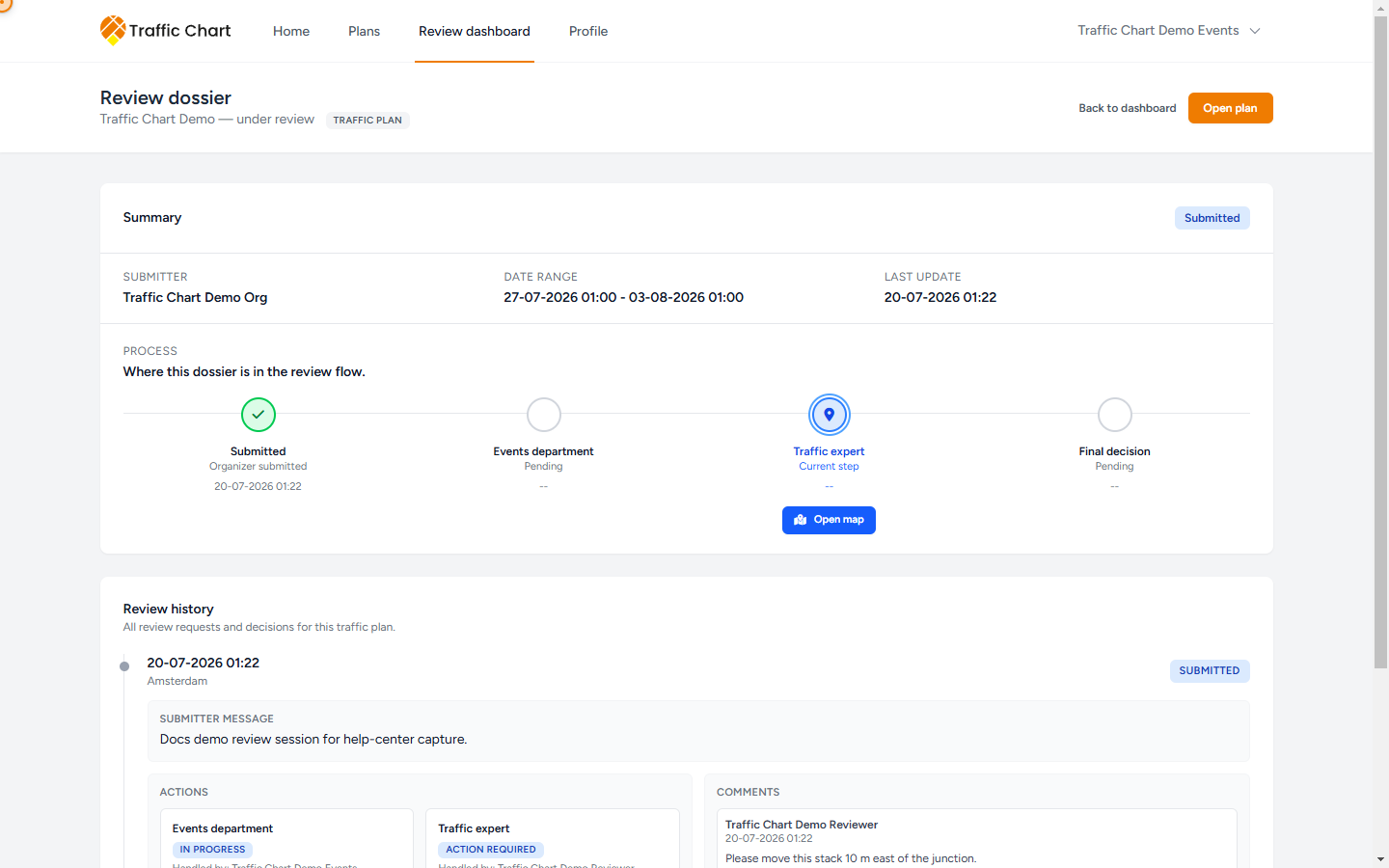
Header actions:
- Back to dashboard returns to Reviews.
- Open plan opens the map editor.
If there is no session yet, the dashboard row shows No dossier yet. There is nothing to open.
Summary
The first card is Summary.
On the right you see the latest request status: Submitted, Changes requested, Approved, or Rejected. If there has never been a request, the badge is No dossier yet.
The same card shows:
| Label | Meaning |
|---|---|
| Submitter | Who owns the plan. Falls back to Unknown if the name is missing. |
| Date range | Plan Start date–End date. |
| Last update | When the plan was last saved. |
The card then continues into Process.
Process
Under Process, the line Where this dossier is in the review flow. sits above four stages.
| Stage | What it means |
|---|---|
| Submitted | Organizer submitted. Timestamp of the current round. |
| Events department | Events has the step, has forwarded, or has already decided. |
| Traffic expert | Technical review, or Not applicable on many event plans. |
| Final decision | Approved, Not approved, or still Pending. |
Sublabels you will actually see:
| Sublabel | When it appears |
|---|---|
| Current step | This stage holds the open request. That is the current owner of the work. |
| Pending | The stage has not happened yet. |
| Forwarded to traffic | Events sent the plan on with Forward to traffic expert. |
| Changes requested | That department asked the organiser to edit. |
| Rejected | That department closed the round as rejected. |
| Reviewed | The traffic expert completed a review without a blocking decision in the sublabel. |
| Approved | That department approved, or the traffic-expert sublabel is Approved. |
| Not applicable | The Traffic expert step is skipped. Common on event plans. |
| Not approved | Final decision after Changes requested or Rejected. |
The current stage is ringed and uses the pin icon. A finished stage shows a check. A blocking outcome shows a warning triangle. A skipped traffic-expert step shows a minus.
When the open step is yours, Open map appears under that stage so you can jump back to the editor.
Read the strip as ownership:
- Events department + Current step — Events holds the plan. Same idea as Current owner: Events department.
- Traffic expert + Current step — the traffic expert holds it. Same idea as Current owner: Traffic expert.
- After Changes requested or Review closed, the organiser edits the same plan and uses Send for review. Same idea as Current owner: Organizer.
- Final decision Approved — the drawing is accepted in the app.
On the live plan, Comments also prints Currently with Events department or Currently with Traffic expert while status is Submitted.
Copies from More dossier actions
The ellipsis on Summary is More dossier actions. It only appears when you are allowed to copy.
There are two copy kinds. They never overwrite the organiser’s plan. The original stays where it is, still locked if review is open.
While the request is open: Create suggestion copy
You must be the person assigned to the current step.
- Open More dossier actions.
- Click Create suggestion copy. The button reads Creating copy... while it works.
- Success toast: Suggestion copy created in Review suggestions.
The copy lands in your Personal library, in a folder named Review suggestions. The plan title is the original title with the prefix Review suggestion –. A second copy of the same source becomes Review suggestion – Demo traffic plan (2).
The copy is unlocked and owned by you. The organiser’s plan stays locked. Use the copy to sketch a suggested layout. Do not treat it as the official reviewed file.
If you are not the current reviewer, the action is missing. The app will refuse a copy from someone else.
Event-plan copies need Event plans enabled on your account. If Event plans says Not enabled for Personal., you cannot store an event copy there. See Event plans handbook and Workspace unavailable.
After the request is closed: Save copy to my plans
When the latest request is Approved, Rejected, or Changes requested, the same menu shows Save copy to my plans. The button reads Saving copy... while it works.
Success toast: Copy saved in Reviewed plans.
The copy lands in your Personal library, in a folder named Reviewed plans. The title prefix is Reviewed copy –. A second copy of the same source is numbered the same way: Reviewed copy – Demo traffic plan (2).
Anyone with closed-dossier access can save this kind of copy, not only the last decision-maker. Events staff who can open the dossier can keep a file even if the traffic expert decided.
This is still your copy. It is not a new municipal decision.
After a copy exists: Open copy and Copy link
When the copy has been created in this browser session, the menu adds:
- Open copy — opens the copy in a new tab.
- Copy link — copies the copy’s URL. Toast Suggestion link copied, or Could not copy the suggestion link if the clipboard is blocked.
If copy creation fails, the toast is Could not create the suggestion copy. Try again, or email customer@traffic-chart.com with the plan URL.
Find older copies later under Plans. For traffic plans look in Review suggestions or Reviewed plans. For event plans, open the Event plans tab and the same folder names.
Review history
The second card is Review history. Subtitle: All review requests and decisions for this traffic plan. (The same card is used for event plans.)
If there has never been a request: No review requests yet.
Each round shows:
- Date and municipality (or Unknown)
- Status badge: Submitted, Changes requested, Approved, Rejected
- Submitter message when the organiser wrote one in Message (optional)
- Actions split into Events department and Traffic expert
- Handled by plus the person’s name or email
- Action required when that department still owns an open Submitted step
- Forwarded to traffic when Events completed a forward
- Reviewed when the traffic expert completed without a separate decision label
- Pending, In progress, Completed, or Skipped as step status
- The department note when one was stored
- Comments for that round: author, time, and text, or No comments yet. / No comment text.
Use this when someone asks “who decided, and what did they write?” The map Comments panel is the live view. The dossier is the file. Live comments: Comments and review status.
What good looks like
- You opened Review dossier from Open dossier, not from a public share link.
- Process shows one Current step, or a finished Final decision.
- Event plans that never needed a traffic expert show Traffic expert as Not applicable.
- Suggestion copies sit in Review suggestions with the Review suggestion – prefix.
- Closed copies sit in Reviewed plans with the Reviewed copy – prefix.
- The organiser’s original plan is still the reviewed file.
If something blocks you
| Situation | What to try |
|---|---|
| No Open dossier | You are the organiser, or you are not linked to that municipality. |
| No More dossier actions | You are not allowed to copy this request. |
| Create suggestion copy missing after Approved | Expected. Use Save copy to my plans. |
| Not enabled for Personal. when copying an event plan | Ask an administrator to enable Event plans, or email customer@traffic-chart.com. |
| Could not create the suggestion copy | Retry. Include the plan URL if you write to support. |
Day-to-day map work: Review for reviewers. What the organiser sees: Review for organisers.