
Comments is municipal review. It is not a sticky-note pad. Map Review tools are a second, narrower control: only the assigned Traffic expert places Pin, Arrow, and Rectangle on an open session.
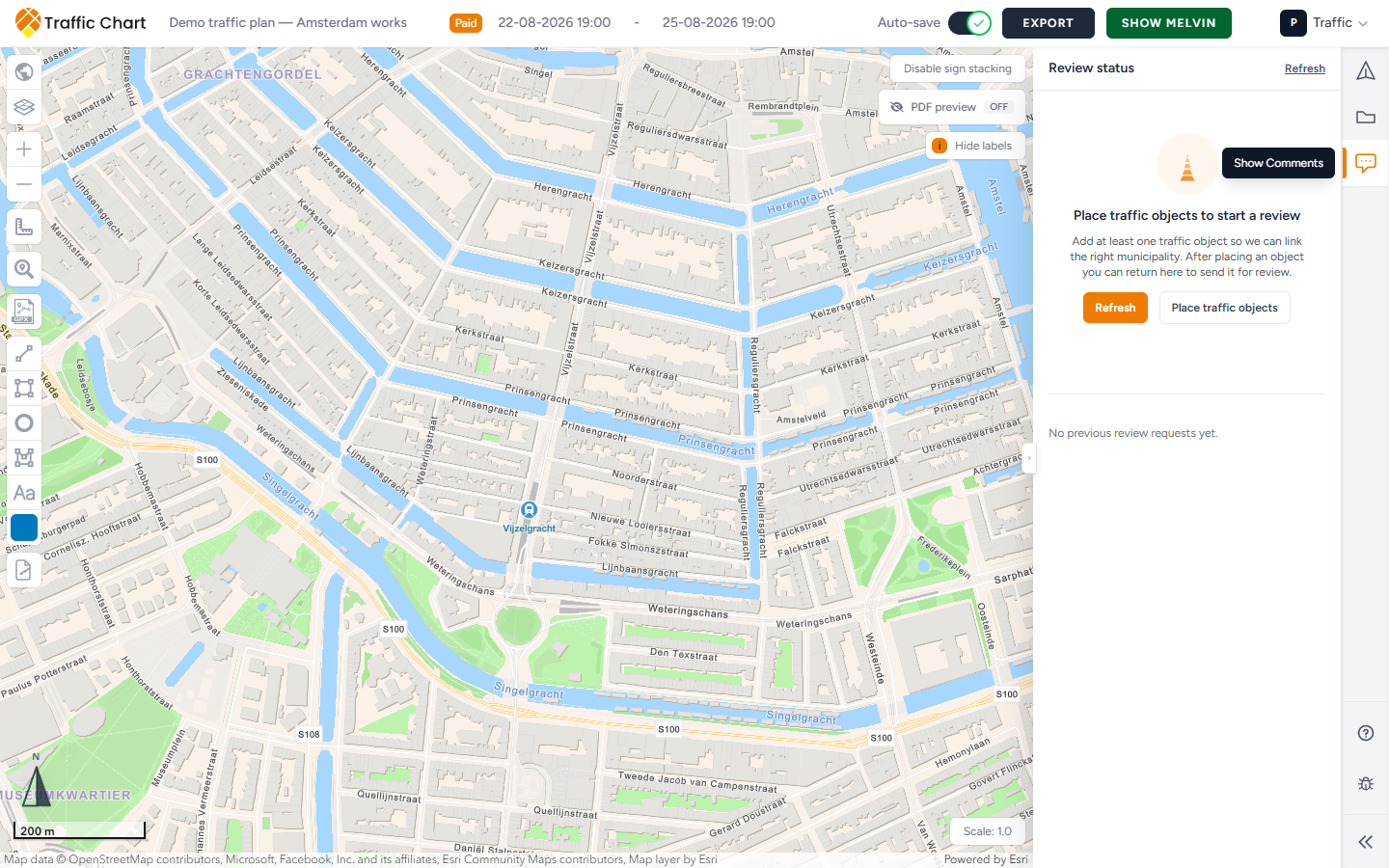
This page names both surfaces, every empty state, and every status card. Who starts the first session, and what to do after Changes requested, is Review for organisers. Reviewer inbox and decisions: Review for reviewers.
When you need this
Use it when the right-hand Comments strip is open, or when Review tools appear on the left of the map.
Skip it if you only need a Copy shareable link or a PDF. That is not an in-app session. Share a plan and read-only view.
Skip it for sketch labels. Add text on the map is a drawing. It is not a review comment. Drawing and measuring.
You do not start the first in-app review. The municipality does.
Two different things
A) Organiser Comments (right-hand strip)
On a traffic plan the strip includes Traffic Objects, Comments, and Posts. Tooltip when the module is available: Show Comments. Collapse folds the strip.
On an event plan the strip is Objects, Areas, Lines & Routes, and Comments. There is no Texts tab. Add text is on the left of the map.
Open Comments. The header is Review status. Refresh reloads it (Refreshing while it works). A status pill can read No review yet or Locked for review.
This panel is how you see In review by municipality, Changes requested, Plan approved, and Messages from municipality. You do not get Pin, Arrow, or Rectangle here.
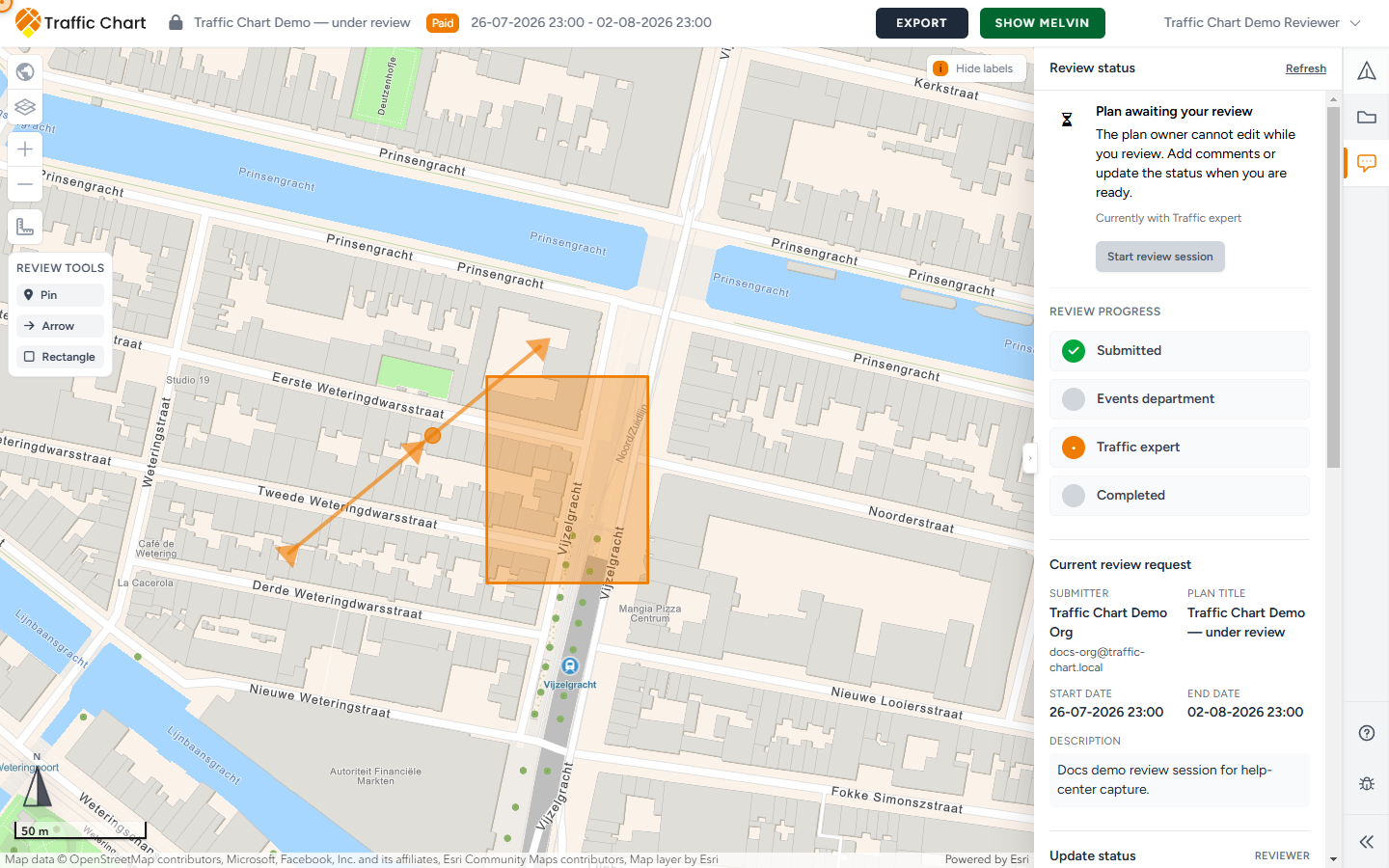
B) Reviewer Review tools (left of the map)
Heading: Review tools. Tools: Pin, Arrow, Rectangle.
They appear only when all of this is true:
- There is an active request with status Submitted
- The current stage is Traffic expert
- You are the assigned person on that step
Events department never gets these tools. Organisers never get them. A share-link viewer never gets them.
Coming soon (some plans still show this)
On some plans Comments in the strip is grey and labelled coming soon. Opening it can show:
- Comments are almost ready
- We are finalizing the new sidebar experience. Comments will unlock after the next release.
- Badge coming soon
That is the old sidebar path. It is honest: the new panel is not on that plan yet.
Map Review tools can still work for the assigned traffic expert on an open session. Organisers on that path cannot use the new Review status card. Follow the municipality’s usual procedure, or a Copy shareable link / PDF, until Comments unlocks.
When the panel is on, ignore this section.
Empty states (owner)
Until there is a session, Comments depends on what is on the map and whether the municipality is connected.
No objects yet — traffic
- Title: Place traffic objects to start a review
- Body: Add at least one traffic object so we can link the right municipality. After placing an object you can return here to send it for review.
- Buttons: Refresh / Refreshing, and Place traffic objects
No objects yet — event
- Title: Place event objects to start a review
- Body: Add at least one event object so we can find the right municipality. Event areas, lines, and text do not count for review routing yet.
- Buttons: Refresh / Refreshing, and Place event objects
Put a real object on the Utrecht site. A camping zone or an Add text label is not enough.
Municipality participates, no session yet
- Title: Ready to submit?
- Body: The municipality has not placed comments yet. Submit your plan through the municipality procedure. For participating municipalities, sharing the plan link is often enough, or you can share a PDF export.
- Copy shareable link — toast Link copied to clipboard, or Could not copy the link
- Export plan when export is available
You still wait for them to click Start review session. If you try to send the first request yourself, the app can say Initial review requests are currently started by the municipality. Submit your plan through the municipality procedure first.
Municipality not connected
- Title: Municipality not connected yet
- Body: Your municipality does not participate in Traffic Chart yet. Submit your plan through the standard procedure on the municipality website.
Use their website. A Traffic Chart link can still help them see the drawing. It does not create a dossier.
Empty states (reviewer / viewer)
When you can start a session, Comments shows:
- No active review session
- Starting a review session will lock the plan for the owner until you update the status.
- Start review session (or Starting...)
- Note: You can only start a session if the plan contains at least one traffic object in a municipality you are assigned to. (Event plans need event objects.)
Enabled tooltip: Start a new review session and lock the plan for the owner.
If Start review session is grey, read the tooltip:
| Tooltip | Meaning |
|---|---|
| Save the plan before starting a review session. | Save first |
| There is already an active review request for this plan. | Do not start a second session |
| Wait until the plan has finished saving or refreshing. | Wait |
| The plan has no reviewable objects in a municipality yet. | Place objects in the assigned municipality |
| The events department must forward this plan to the traffic expert first. | Events owns the first step |
| You are not assigned to the municipality for this plan. | Wrong account for Utrecht (or whichever pin) |
If you cannot start anything: No review requests yet for this plan.
Success toast: Review session started. Failure: You can't start a review session for this plan.
Status cards
Open Comments. Read the title, then the body. The same status looks different if you own the plan, if the step is assigned to you, or if you are only viewing.
Submitted
| Who | Title | Body |
|---|---|---|
| Owner | In review by municipality | Your plan is locked while the reviewer looks at it. We will notify you when they respond. |
| Assigned reviewer | Plan awaiting your review | The plan owner cannot edit while you review. Add comments or update the status when you are ready. |
| Viewer | In review | This plan is being reviewed by the municipality. |
Extra lines: Currently with Events department or Currently with Traffic expert. Time line Submitted 12 Aug 2026, 09:14. Reviewer message when a note exists.
Header save: Plan is locked while under review. Event drawing tools: This event plan is locked and cannot be edited.
Changes requested
Title for everyone: Changes requested.
| Who | Body |
|---|---|
| Owner, feedback already with you | Update the plan based on the reviewer comments, then submit again. |
| Owner, Events has not forwarded yet | The traffic expert left feedback. The events department will forward it to you. |
| Reviewer | You requested changes. Waiting for the owner to update and resubmit. |
| Viewer | Changes were requested; the owner needs to update the plan before resubmitting. |
Time line: Updated 12 Aug 2026, 16:02.
If you resend too soon: Municipality feedback has not been forwarded to you yet.
Rejected (title is Review closed)
- Title: Review closed
- Body: The review was closed. The owner can make adjustments before sending a new request.
Same for owner, reviewer, and viewer. A new Send for review is a new round.
Approved
- Title: Plan approved
- Body: This plan has been approved. Further edits are disabled.
- Time line: Approved 13 Aug 2026, 11:05
- Header can also say This plan is locked because it has been approved
In-app Approved is this drawing accepted in Traffic Chart. It is not, by itself, a legal permit. The municipality may still have paper, fees, or conditions outside the app.
You cannot resubmit an approved plan: This plan is already approved and cannot be resubmitted.
Review progress
Under the card, Review progress lists Submitted, Events department, Traffic expert, then the outcome: Completed, or Approved / Rejected / Changes requested when the round has finished.
On many event plans Traffic expert is skipped.
After they ask for changes — Send for review
This form is for the owner on a later round. Not for the first session.
- Read Messages from municipality and any Reviewer message.
- Edit the same plan. Save.
- Open Send for review. Body: Connect your plan to the right municipality or export if none are available.
- Select the municipality reviewer for this plan.
- Choose Municipality.
- Message (optional) — placeholder Add context for the reviewer.
- Send review request (or Sending...). Toast Review request sent. Failure: Could not submit review request.
The plan locks again. You are back on In review by municipality.
If no reviewer can be linked:
- We could not find a reviewer
- Add a traffic object in the right municipality so we can link a reviewer, or export and share manually.
- Export plan
Pending review can appear while a request is waiting.
Reviewer decisions
Traffic expert — Update status
Heading Update status, with a Reviewer hint.
Choose Approve, Request changes, or Reject. Message placeholder: Let the plan owner know what you decided. Confirm with the same action name (Approve, Request changes, or Reject), or Saving.... Toast Status updated. Failure: Could not update status.
Events department
Heading Events department actions.
On a traffic plan: Forward to the traffic expert or send a decision back to the submitter. Usual action: Forward to traffic expert. You can also Request changes or Reject. Message placeholder: Let the submitter know what needs to be updated. Confirm with Forward to traffic expert, Approve, or Send update.
On an event plan Events can finish the review. Description: Make a decision on this event plan. Heading Events department decision. Forward to traffic expert is hidden. Choose Approve, Request changes, or Reject.
When Direct communication is off and the traffic expert already wrote feedback: Forward feedback to submitter. Toast Forwarded successfully. Failures: Could not forward review request / Could not forward feedback.
Current request, messages, history
Current review request lists Submitter, Plan title, Start date, End date, optional Description, Events department note, Traffic expert note. Reviewers with access get Open dossier. Organisers do not.
Messages from municipality is the live comment list. Empty: No comments for this request. A finished note is Closed. Show on map jumps to it. The organiser can Close a comment after they handle it.
More actions (your own open comments, if you can manage them): Edit or Delete. Edit placeholder Update this comment.... Save / Cancel. Delete asks Delete this comment? This cannot be undone. Toasts: Comment updated, Comment deleted. Failures: Could not update comment, Could not delete comment.
If the app blocks an edit: Only pending review requests can be commented on. Only the author of this comment can edit or delete it. Resolved comments cannot be edited or deleted.
History & comments holds earlier rounds. Show / Hide. Empty: No previous review requests yet. A row can show Unknown area, Submitted by Sam Rivera - 12 Aug 2026, 09:14, Last updated, Message from submitter, Events department, Traffic expert.
Place a map comment (traffic expert)
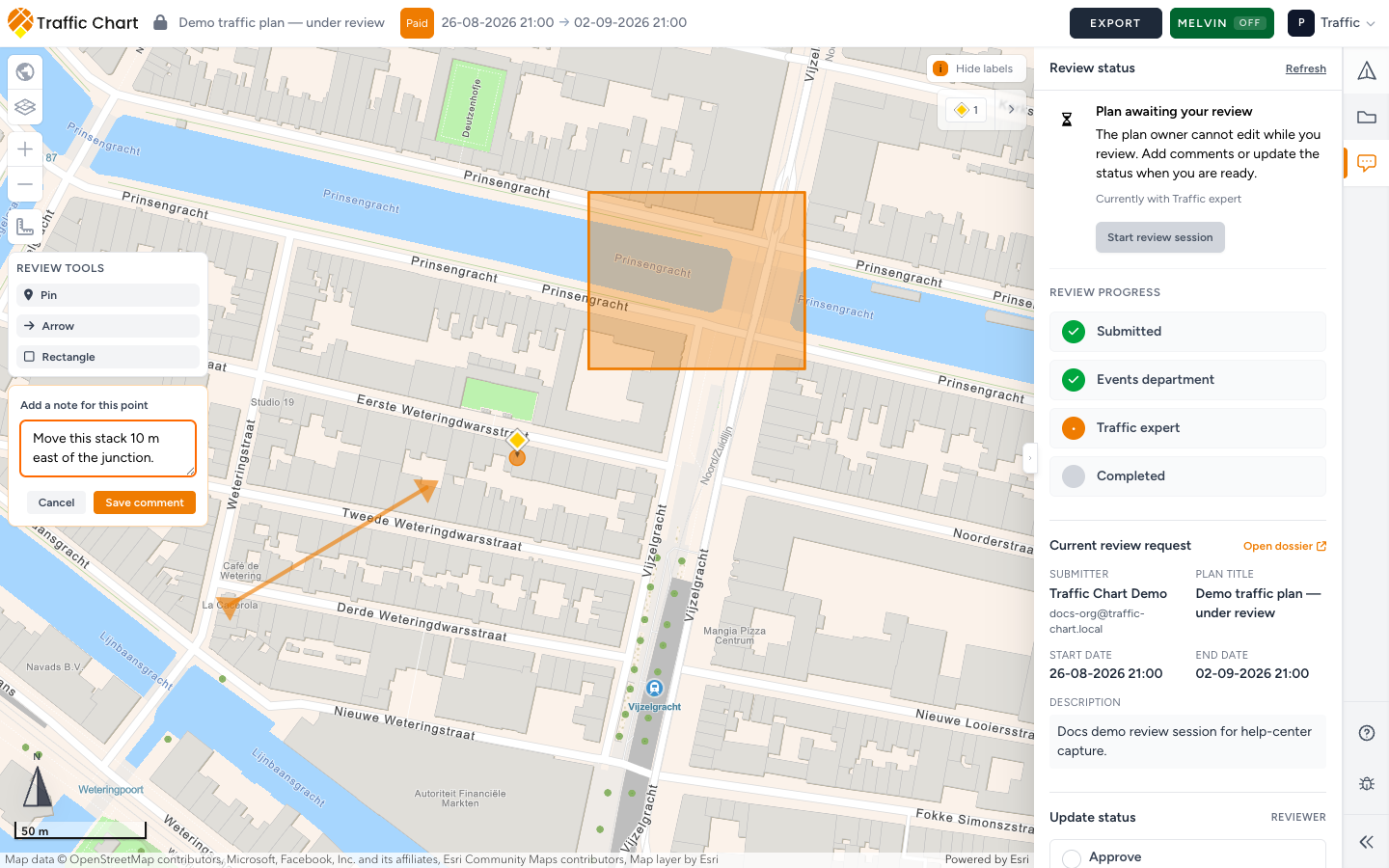
- Confirm Review tools is on the left.
- Click Pin, Arrow, or Rectangle.
- Click or draw on the map.
- Heading: Add a note for this point, Add a note for this arrow, or Add a note for this area.
- Placeholder: What needs to change here?
- Save comment (or Saving...). Cancel drops the draft.
Toast Comment added. Failure Could not add comment. An unsupported shape can say Unsupported geometry type for review comment.
Write a place and an action (“move the stack 10 m east on the Utrecht side street”), not only “fix”. Place comments before you set Changes requested.
Add text, Add line, Add rectangle, Add circle, and event Texts are sketches. They do not appear in Messages from municipality. Crew labels stay on the drawing. Review comments lock to this request.
What good looks like
- Organisers waited for Start review session. They did not hunt for Pin.
- Event plans have at least one event object on the real site.
- Traffic-expert comments sit on the problem, with a sentence the owner can execute.
- After Changes requested, the owner edited the same plan and used Send for review.
- Plan approved was treated as a drawing lock, not as a permit in the letterbox.
- Sketch Add text was never used as a substitute for Review tools.
If something blocks you
| Situation | What to try |
|---|---|
| coming soon on Comments | Expected on some plans. Map Review tools can still work for the assigned traffic expert. Organisers use the municipality procedure |
| No Send for review on a new plan | Expected. Wait for the municipality |
| Place event objects to start a review | Place at least one event object. Areas, lines, and text do not count |
| No Review tools | You are not the assigned Traffic expert on an open Submitted step |
| Plan will not edit | My plan is locked for review |
| The traffic expert left feedback. The events department will forward it to you. | Wait for Forward feedback to submitter |
| You only needed a link | Share a plan and read-only view |
Email customer@traffic-chart.com only if access looks wrong for your account. Include the plan URL.