Ask Traffic Chart to add a plate or event object that is not in this plan’s catalogue. The request lives in the editor. You do not leave the map.
Use this when you have already searched, expanded every category, and still cannot find the item. Skip it if the country is wrong, if a Combination sign can carry the extra text, or if you only need a different size of something already in the list.
A request does not unlock extra free signs. It does not skip checkout. It does not change Country. Keep drawing with the closest catalogue item if the works cannot wait.
When you need this
Use it on a Traffic Plan when Search traffic signs returns No signs found, or when you know an official code that is missing from this country’s set.
Use it on an Event Plan when Search objects... returns No objects found., or when the kit on site has no matching tile.
Do not use it to mix national catalogues on one traffic plan. That is a Country problem: Wrong country or missing traffic signs.
Do not use it for a custom information board if a Combination sign template already exists. Build that board instead: Combination signs.
Find the button
The label is not the same on both editors. Match the capital I.
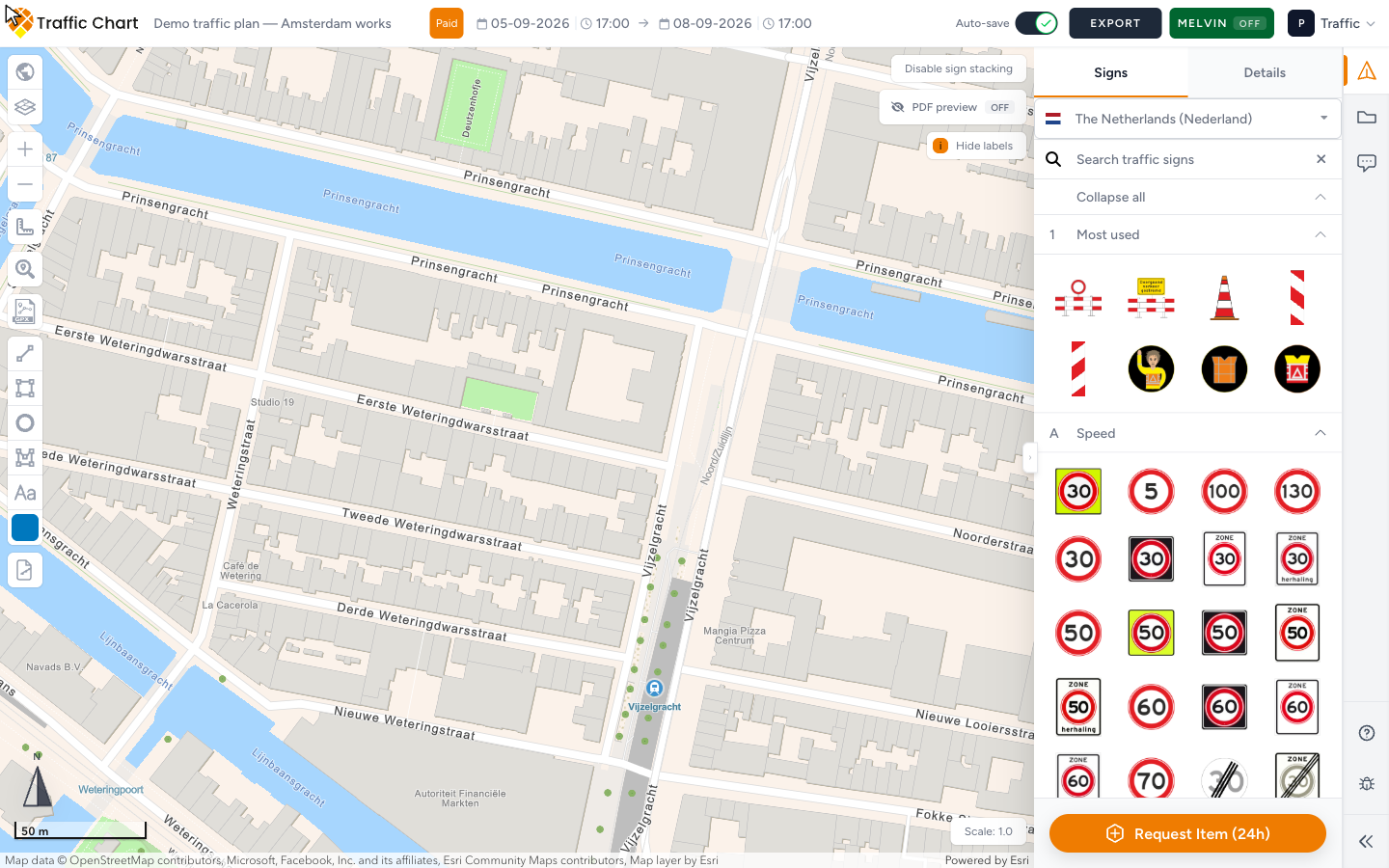
Traffic plan — Request Item (24h)
- Open Traffic Objects.
- Stay on Signs (the button also stays visible if you switch to Details).
- Confirm the country list at the top. A toast such as Showing signs for The Netherlands (Nederland) based on traffic plan follows a country change.
- Type in Search traffic signs. Use Expand all / Collapse all if the list is long.
- Scroll to the bottom of that panel.
- Click Request Item (24h).
Event plan — Request item (24h)
- Open Objects. Not Areas. Not Lines & Routes. Not Comments.
- Type in Search objects.... Empty: No objects found.
- Use Collapse all / Expand all if categories are folded.
- Scroll to the bottom of Objects.
- Click Request item (24h). Note the lowercase i.
The (24h) on the button is the reply target. Submit once. Then keep working.
If the map is still loading on an event plan, Objects can toast Map is not ready yet. Wait, then open the request.
What opens
The button opens an in-app request form over the editor.
Fill it in this language, then send it. If the form does not appear, email customer@traffic-chart.com from the same account. That is the backup, not a second product.
You can also open Help in the strip and use Email support. Same mailbox.
What to include
Write as if a catalogue editor will add the item tomorrow. Vague “we need a sign” delays the 24h target.
Include all of this:
- Country of the plan, for example The Netherlands, not “Europe”
- Official code if you know it (C43, F19, or the national number on the plate)
- A photo of the real plate or object, or a manufacturer drawing
- Where it will sit: a Utrecht side street is not a festival field
- Whether this is a Traffic Plan or an Event Plan
- Typical size in metres for event kit (for example a 2 m × 3 m tent)
- The plan URL from the address bar
Say what you already tried: the search text, and the closest tile you are using in the meantime.
Keep drawing while you wait
Do not pause the plan for a missing tile.
On a traffic plan, place the nearest legal plate, or build a Combination sign if extra text is the real gap. Search again by code and by description.
On an event plan, place the closest Objects type and rename it with Label. Zones, routes, and Add text can mark the spot until the new type exists. Areas, lines, and text still do not count as review objects. If a municipality will review in the app, keep at least one real object on the site. Event objects, areas, and routes.
When the item is added to the catalogue, place it yourself. Traffic Chart does not drop it onto Demo traffic plan for you. It does not rewrite stand-ins you already put down. Place the new type and delete the stand-in if you can still edit.
What this does not do
- It does not raise the free sign cap. The new plate still counts when you place it. I can’t place more signs.
- It does not mark the plan Paid.
- It does not change Country.
- It does not replace municipal review or a legal permit.
- It does not add an official road sign to an event plan. Event Objects is site kit. Road plates belong on a Traffic Plan.
- It does not add Bulk signs. That is a permission, not a missing plate. Feature not available for my account.
Before you request: empty search vs wrong list
| What you see | What it usually means | What to do first |
|---|---|---|
| No signs found | Search text or collapsed categories | Clear Search traffic signs. Expand all. Try the code and the Dutch or English name |
| No objects found. | Search text on Objects | Clear Search objects.... Expand all. Check Other |
| Familiar plates missing, odd names present | Wrong Country on the plan | Wrong country or missing traffic signs. Create a new plan if the country is wrong |
| You need header + body + icons | A Combination sign template | Combination signs |
| Map is not ready yet | Event map still loading | Wait, then search again |
| Grey Bulk signs or Displace sign stack | Account permission, not a missing plate | Feature not available for my account |
Event kit is grouped as Furniture, Safety & Security, Food & Drinks, Fencing, Trailers & Units, Flags & Banners, Power Supply, Sanitary Facilities, Waste, Water & Cleaning, Entertainment, Staff, Mobility, and Other. Expand those before you decide the type is missing.
Steps (worked example)
You are drawing Demo traffic plan for a Utrecht side street. The works need a plate whose code you have on paper. Search traffic signs shows No signs found.
- Confirm the country toast, for example Showing signs for The Netherlands (Nederland) based on traffic plan.
- Search the code, then the description. Expand all.
- If a yellow information board would do, open a Combination sign template instead of requesting a new national plate.
- If it is still missing, scroll to Request Item (24h).
- In the form, name the country, paste the code, attach a photo, and write “Utrecht side street, traffic plan, temporary plate at the works entrance.”
- Send once. Place the closest catalogue plate so the drawing can go to the municipality today.
- If the form never opens, email customer@traffic-chart.com with the plan URL, country, code, and photo.
Same idea on an event field: Objects → Request item (24h) → say it is a festival field, not a public road.
What good looks like
You searched first. The country matches the road authority. The form (or the email) has a code or a photo, and says traffic vs event. Demo traffic plan already has the closest stand-in on the map. You did not wait idle for 24 hours if the works start tomorrow.
If something blocks you
| Situation | What to try |
|---|---|
| No Request Item (24h) / Request item (24h) | You are on Areas, Lines & Routes, Comments, or Posts. Open Signs or Objects |
| Form does not open | Allow pop-ups for this site, disable a blocker, retry, then email customer@traffic-chart.com |
| You need the item on paper today | Keep the closest catalogue item. The request will not print in time |
| Wrong plates in the list | Fix Country. Do not request a foreign plate onto this plan |
| Plan will not edit | You are not the assigned editor, or the plan is locked. I can’t open or edit a plan |