
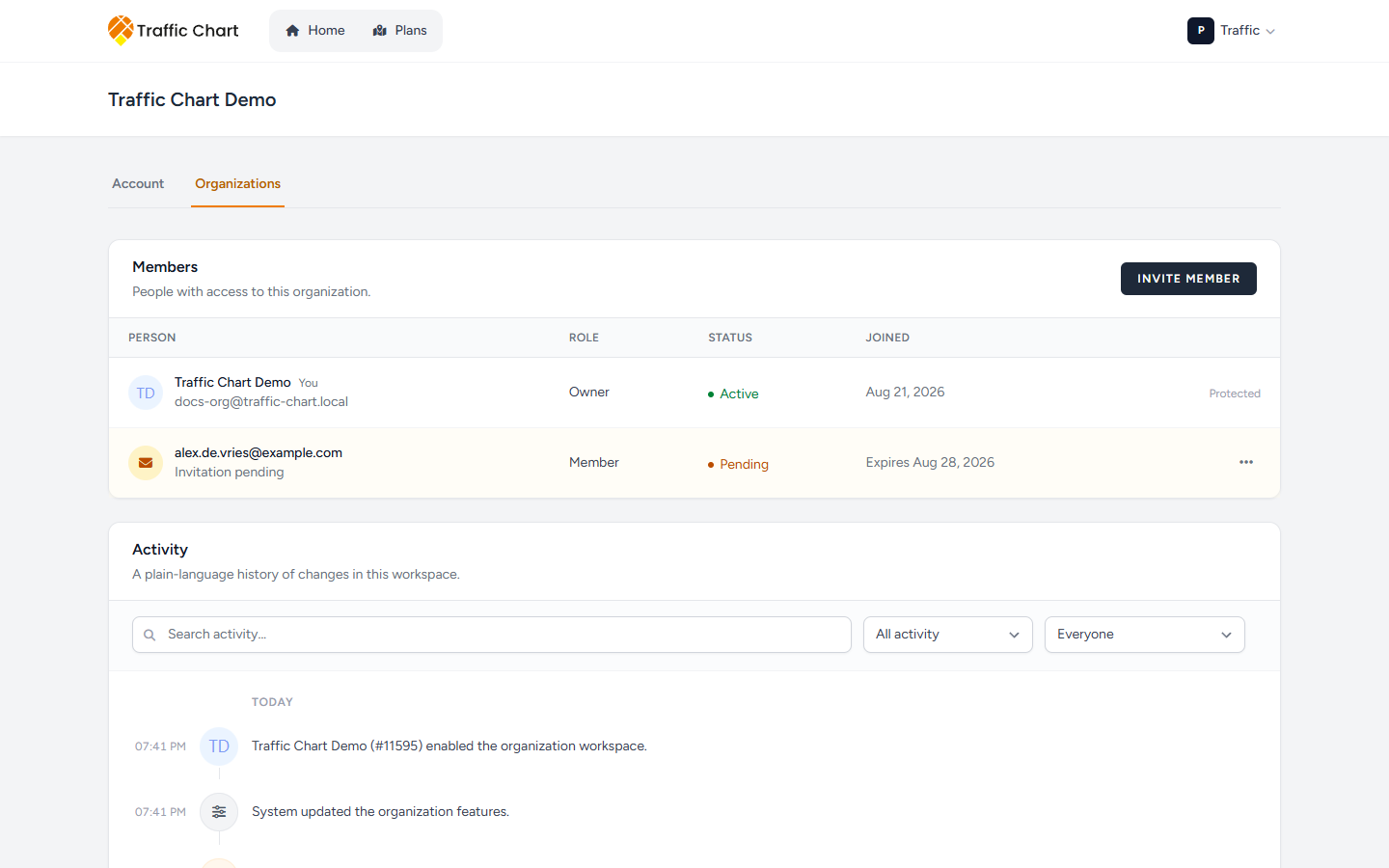
Activity is a plain-language history of changes in this workspace. It answers “who invited Alex?” and “who moved Demo traffic plan?”. It is not a billing invoice.
Use it on Manage Acme Events when you are an Owner or Administrator. Skip it if you only need to change a role or send Invite member — that is Organizations and members.
Members never see Activity. If you cannot open Members & access, you cannot open this log.
Open Activity
- Click your initials and first name.
- Open Organization settings (the sliders next to Switch workspace), or Settings → Organizations.
- Click Members & access for Acme Events.
- The page title is Manage Acme Events.
- Scroll below Members (and Invitations). The block title is Activity.
Description: A plain-language history of changes in this workspace.
Who can see it
Anyone who can open Members & access for that organization: Owner and Administrator.
A Member of Acme Events can still open team plans they are allowed to see. They do not get this log, they do not get Invite member, and they do not get Billing.
Personal has no Activity. Personal work is not an organization workspace.
Empty and first rows
Empty title: No activity yet. Body: Invitations, member changes, plans and folders will appear here.
Invite Alex, assign an editor, or move a plan. Then refresh the page if a brand-new line is missing. The log records organization changes, not every sign you place on the map.
Rows group under Today, Yesterday, or a calendar day such as 21 August 2026. Each line is one sentence. A clock on the left is the time.
Actors are people, or one of these labels:
- System
- Traffic Chart administrator
- Former user
- a new member — used when the person’s name is not shown, for example before they join
A filter can list those same actor labels under Performed by.
Read a line (filled examples)
These are the sentences as they appear, with real names.
Organization
- Sam Rivera created the organization.
- Sam Rivera renamed the organization from “Acme” to “Acme Events”.
- Sam Rivera suspended the organization.
- Sam Rivera reactivated the organization.
- Traffic Chart administrator enabled the organization workspace.
- Traffic Chart administrator disabled the organization workspace.
- Sam Rivera changed the billing sponsor.
- Sam Rivera updated the organization billing details.
- Sam Rivera updated the organization subscription.
- Sam Rivera updated an organization subscription payment.
- Sam Rivera updated the organization features.
People & access
- Sam Rivera invited Alex de Vries as Member.
- Sam Rivera resent the invitation to Alex de Vries.
- Sam Rivera revoked the invitation for Alex de Vries.
- Alex de Vries declined the invitation.
- Alex de Vries accepted the invitation and joined the workspace.
- Sam Rivera added Alex de Vries as Member.
- Sam Rivera changed Alex de Vries from Member to Administrator.
- Sam Rivera suspended access for Alex de Vries.
- Sam Rivera restored access for Alex de Vries.
- Sam Rivera removed Alex de Vries from the organization.
- Alex de Vries left the organization.
If the invitee’s name is hidden, the same invite line can read: Sam Rivera invited a new member as Member.
Plans
- Sam Rivera created “Demo traffic plan”.
- Sam Rivera assigned Alex de Vries to “Demo traffic plan”.
- Sam Rivera removed the assigned editor from “Demo traffic plan”.
- Sam Rivera moved “Demo traffic plan” to another folder.
- Sam Rivera copied “Demo traffic plan” into the workspace.
- Sam Rivera transferred “Demo traffic plan” between workspaces.
- Sam Rivera transferred “Demo traffic plan” into the workspace.
- Sam Rivera transferred “Utrecht 2026” into the workspace (3 plans).
- Sam Rivera transferred “Demo traffic plan” out of the workspace.
- Sam Rivera deleted “Demo traffic plan”.
A plan with no stored title can fall back to a traffic plan or an event plan.
Folders
- Sam Rivera created the folder “Utrecht festival”.
- Sam Rivera renamed the folder to “Utrecht festival”.
- Sam Rivera moved the folder “Utrecht festival”.
- Sam Rivera transferred the folder “Utrecht festival” between workspaces.
- Sam Rivera transferred the folder “Utrecht 2026” into the workspace (3 plans).
- Sam Rivera transferred the folder “Utrecht festival” out of the workspace (3 plans).
- Sam Rivera deleted the folder “Utrecht festival”.
One plan in a folder transfer reads (1 plan) instead of (3 plans). A nameless row can fall back to a folder or an item.
Moving, copying, and Assign editor are the actions behind those plan lines: Move, copy, and assign an editor. Folders: Folders and the library. Joining: Join an organization.
Filter the list
Filters apply as you type. You do not click Search.
| Control | What it is |
|---|---|
| Search activity | Accessible name of the search box |
| Search activity… | Placeholder. Matches names and sentence text |
| Activity type | Accessible name of the type list |
| All activity | Default type |
| People & access | Invites and memberships |
| Plans | Plan create, move, copy, transfer, assign, delete |
| Folders | Folder create, rename, move, transfer, delete |
| Organization | Rename, suspend, workspace, billing, features |
| Performed by | Accessible name of the actor list |
| Everyone | Default actor |
| Named people | Everyone who has appeared as an actor |
| Traffic Chart administrator | Platform action |
| System | Automated action |
| Former user | A person whose account is gone |
| Clear filters | Resets search, type, and actor |
No matches: No activity matches these filters. Use Clear filters on that empty state as well.
While a filter request runs, a spinner is labelled Loading older activity…. Wait. Do not hammer the selects.
Load older rows
The footer is not a page number.
- Load older activity — older batches, when the list has more
- Loading older activity… — while that request runs
- Showing 20 of 48 activities — your numbers; this is twenty loaded of forty-eight total
- Load per batch — 10, 25, or 50
Start at 25 if you are skimming today. Use 50 only when you are hunting a rename from last year.
Activity does not undo a change. Restore access from Members. Move a plan back from Plans. Ask support only if a line and the live members table disagree.
What good looks like
You opened Members & access as Owner or Administrator. Activity listed Sam Rivera’s invite of Alex de Vries, the role change, and the move of Demo traffic plan. Today sat above older days. A tight search for “Demo traffic plan” left a short, readable list. Clear filters returned All activity / Everyone.
If something blocks you
| Situation | What to try |
|---|---|
| No Activity block | You are a Member, or you are on Personal. Open Switch workspace → Acme Events, then Members & access as Owner or Administrator |
| No activity yet on a busy team | You are on the wrong organization. Confirm the page title Manage Acme Events |
| No activity matches these filters. | Clear filters. Search a person name, not a sign code |
| Line says Former user or a new member | Expected when the account is gone or the name is hidden |
| Line says Traffic Chart administrator | Traffic Chart changed workspace or billing on your behalf. Email customer@traffic-chart.com if that is a surprise |
| You needed who drew the signs | Activity does not log map edits. Open the plan and the materials list instead |